Introduction
Amazon is one of the world’s biggest online shopping platforms, and millions of people use it every day. But sometimes problems happen—maybe your order is delayed, your package is damaged, or you need help with payment issues. In all these cases, knowing how to contact Amazon customer care can save you time and stress. This guide explains all the easiest and fastest ways to reach Amazon support in 2025.
Why You May Need Amazon Customer Support
how to contact amazon customer care
People contact Amazon customer care for many reasons. Some of the most common include:
- Order not delivered
- Wrong or damaged product
- Refund or return help
- Account login issues
- Payment or billing problems
- Prime membership inquiries
No matter your issue, Amazon has multiple support channels to help you anytime.
1. Contact Amazon Customer Care Through Live Chat (Fastest Method)
how to contact amazon customer care
Live chat is one of the most popular ways to contact Amazon because it is quick, simple, and available 24/7.
How to use live chat
- Open the Amazon website or app.
- Log in to your account.
- Scroll to the bottom and click Help.
- Select your issue from the list.
- Choose Chat with us.
You’ll instantly connect with a support agent who can help you resolve almost any problem within minutes.
2. Contact Amazon Customer Care by Phone
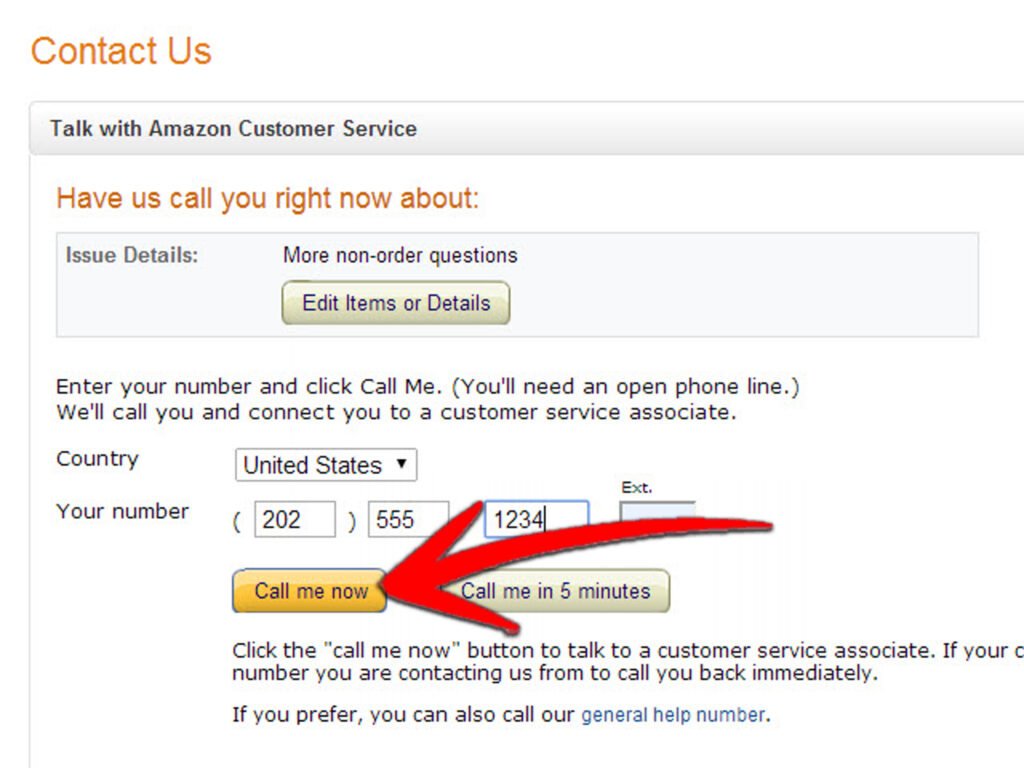
If you prefer speaking with a real person, Amazon also offers phone support. The availability may vary depending on your region, but the process is very simple.
Steps to receive a call from Amazon
- Open the Help section.
- Choose your problem.
- Select Request a call.
- Amazon will call you within seconds.
This method is useful for complicated issues, such as account security or technical problems.
3. Contact Amazon Support Through Email
If your issue is not urgent, emailing Amazon customer care is a great option.
How to use email support
- Go to the Help page.
- Choose your issue.
- Click on Contact Us.
- Select the Email option.
Email support is helpful for sending screenshots, documents, or explaining detailed problems.
4. Contact Amazon Customer Care Through the Mobile App
The Amazon app provides a smooth and quick way to ask for help.
Steps
- Open the Amazon app.
- Tap the three lines (menu).
- Choose Customer Service.
- Select your issue.
- Pick Chat, Call, or Email support.
The app is especially useful if you’re traveling or don’t have access to a computer.
5. Use the Amazon Help Center for Quick Solutions
Many issues can be solved without talking to support. Amazon’s Help Center includes guides on:
- Tracking your shipment
- Managing returns
- Cancelling orders
- Payment settings
- Prime benefits
If your problem is simple, checking the Help Center can save you time.
Tips to Get Faster Help
To speed up your support experience:
- Keep your order number ready
- Use live chat for quick issues
- Use the “Call me” option for detailed problems
- Explain your issue clearly and politely
- Attach screenshots if needed
These tips help the support team resolve your issue much faster.
Conclusion
Knowing how to contact Amazon customer care is essential for a smooth shopping experience. Whether you want live chat, a quick phone call, email support, or help through the app, Amazon offers multiple simple ways to assist you. By following this guide, you can get your issues resolved quickly and enjoy stress-free online shopping.